-
-
-
Abu Dhabi | Dubai | Musaffah


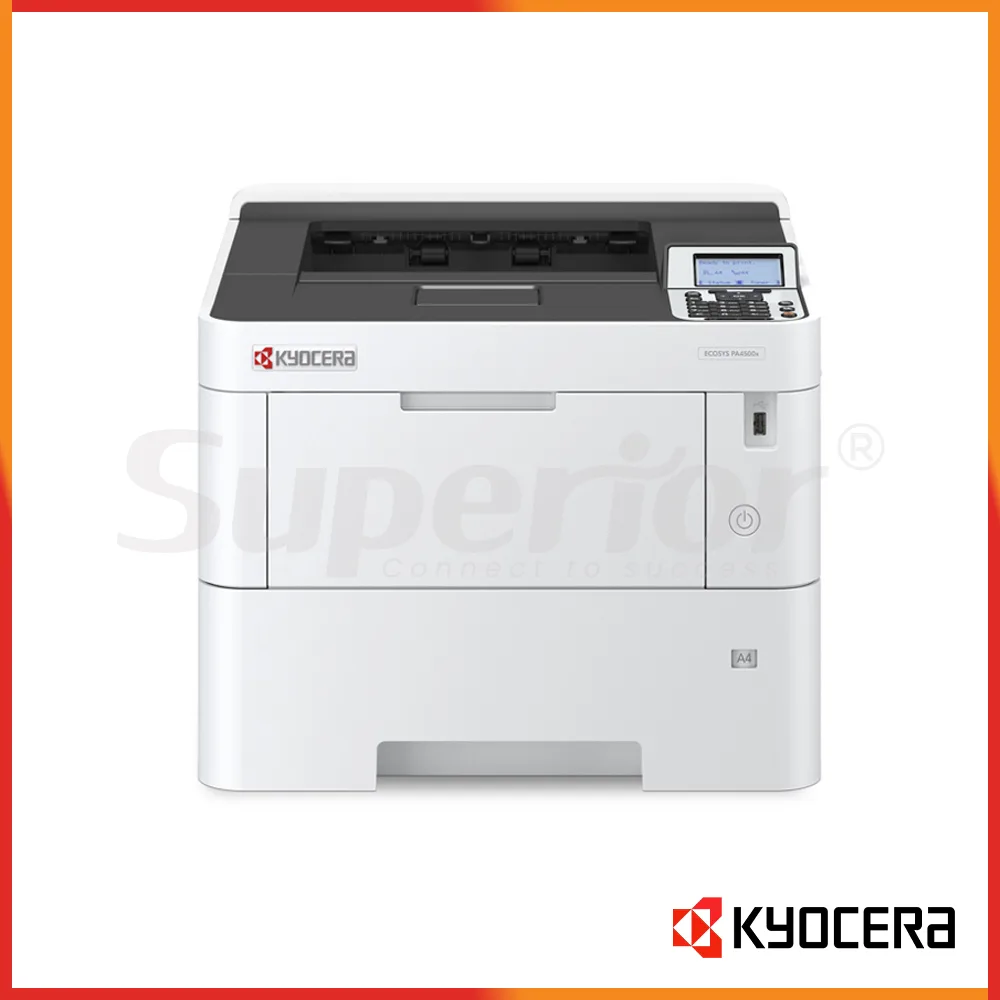


Kyocera ECOSYS PA6000x | Latest Model Mono Printer
|
The Kyocera ECOSYS PA6000x is a current-generation A4 monochrome printer built for offices that need fast, dependable black-and-white document output without the size or cost of a multifunction copier. This listing is for the Latest Model condition, so SOS supplies it as new stock rather than as a refurbished machine. It prints at up to 60 pages per minute on A4, supports automatic duplex printing, and is designed for shared office use where several staff members send regular print jobs throughout the working day. For companies that mainly print invoices, reports, contracts, delivery notes, purchase orders, forms and other mono documents, the PA6000x can be a more practical choice than paying for colour, copying or scanning functions that are not required.
The PA6000x is especially suitable for teams that already have scanning handled by another MFP or document scanner and want a dedicated high-speed printer for the heavier black-and-white workload. It fits well in accounts departments, administration teams, reception and back-office areas, schools, clinics, warehouses, logistics offices, trading companies and service businesses. The compact desktop format also makes it easier to place than a floor-standing copier, while optional paper feeders allow the machine to grow into a higher-capacity shared printer when daily volumes increase.
In Abu Dhabi, the PA6000x is a strong fit for businesses that handle steady streams of paperwork and need pages ready quickly. Accounts departments can use it for invoices, statements, payment documentation and month-end reports. Administration teams can use it for internal forms, letters, policies and tender documents. Schools and training centres can use it for worksheets, notices and course material where colour is not essential. Because the machine is mono only, it is easier for a buyer to keep the printing requirement focused: fast black-and-white output, straightforward paper handling and a toner plan built around one black cartridge.
In Dubai, where shared offices often have multiple users and heavier network traffic, the PA6000x works well as a central departmental printer. It includes wired network connectivity as standard, and optional wireless interfaces are available where the installation requires them. A sales office might keep a colour MFP for presentations and customer-facing documents while using the PA6000x for the bulk of contracts, quotations, stock lists and internal reports. This split can make sense when most pages are black and white but the team still needs occasional colour elsewhere.
In Musaffah and other industrial areas, the PA6000x can be useful for trading, automotive, engineering, warehouse, logistics and contracting offices that generate frequent delivery notes, job sheets, parts lists, purchase orders, inspection records and technical paperwork. These environments often value speed, simple operation and easy paper replenishment more than advanced finishing. If the site has a higher paper demand, SOS can discuss optional feeders so staff spend less time refilling the cassette during busy periods.
The right fit depends on how the office works. A printer rated at 60 ppm is useful when jobs arrive in bursts, when several users print to the same device, or when long reports need to clear quickly. It is less important if the office prints only a few pages per hour. SOS can help compare the PA6000x with slower ECOSYS models or with an A4 mono MFP if scanning and copying are also required at the same location.
| Specification | Kyocera ECOSYS PA6000x |
|---|---|
| Condition | Latest Model / new stock |
| Machine type | A4 monochrome desktop printer |
| Primary function | |
| A4 mono print speed | Up to 60 ppm |
| Duplex print speed | Up to 43 ppm A4 |
| First print time | Approx. 4.5 seconds or less |
| Print resolution | Up to 1200 x 1200 dpi |
| Warm-up time | Approx. 25 seconds or less |
| Memory | 512 MB standard; expandable up to 2.5 GB |
| Processor | ARM Cortex-A53 dual core 1.4 GHz |
| Standard paper input | 500-sheet cassette + 100-sheet multipurpose tray |
| Maximum paper input | Up to 2,600 sheets with supported options |
| Automatic duplex | Yes |
| Storage | Optional SSD: 64 GB, 256 GB or 512 GB in referenced EMEA specification |
| Maximum monthly duty | Enquire with SOS for the specification applicable to the UAE supply configuration |
For a UAE office buyer, the useful numbers are the 60 ppm A4 speed, standard duplex printing and 600-sheet standard input capacity. These specifications make the PA6000x suitable for a busy department where the printer may be used by many people rather than a single desk. The first print time is also important in normal office use because many jobs are short. A fast first page means users do not have to wait long for a one-page letter or a small batch of documents even though the machine is designed to handle larger jobs.
The standard 512 MB memory can be expanded, and optional SSD storage is available for environments that require additional document handling or security-related functions. Not every office needs these options. If the printer will mainly receive normal Word, Excel, PDF and ERP output over the network, the standard setup may already be appropriate. If the company uses heavier print files, secure job storage or specific workflow requirements, SOS can review whether additional memory or SSD storage is worthwhile before the machine is ordered.
The PA6000x is an A4 printer, not an A3 device. That distinction is important for buyers comparing it with TASKalfa copiers. It can handle standard office sizes up to Legal through the normal paper path, plus supported custom sizes and banner media through the multipurpose tray, but it is not intended to replace an A3 copier where drawings, A3 spreadsheets or larger-format documents are part of the daily workflow. If A3 is required even occasionally, tell SOS before deciding on this model.
| Function | Performance | Buyer Note |
|---|---|---|
| Up to 60 ppm A4 mono | Main function of the PA6000x | |
| Duplex print | Up to 43 ppm A4 | Automatic two-sided printing is standard |
| First print | Approx. 4.5 seconds or less | Useful for frequent short office jobs |
| Resolution | Up to 1200 x 1200 dpi | Suitable for sharp business text and line work |
| Copy | Not available | This model is a printer, not an MFP |
| Scan | Not available | Use a separate scanner or choose a Kyocera mono MFP |
| Fax | Not available | Choose an MFP if fax is required |
The PA6000x is focused on printing, and that is one of its main advantages for the right buyer. There is no scanner lid, document feeder or copier control panel taking up space. A business that already scans through another machine can place the PA6000x close to the team that produces the most black-and-white pages and use it as the department's dedicated print engine. This can reduce congestion on a shared colour MFP, especially when long mono reports are being printed at the same time as other staff need to scan or copy.
At up to 60 ppm A4, the machine is suited to situations where users notice the difference between a normal desktop printer and a faster departmental model. Large PDF reports, account statements, policy documents, invoices and batch-generated ERP documents can clear the queue more quickly. Automatic duplex printing is standard, so two-sided documents can be produced without manually turning the paper. This is useful for contracts, manuals, reports and internal documentation where double-sided output is the normal office standard.
Print resolution reaches 1200 x 1200 dpi in the referenced specification. For normal business printing, that provides clean text, fine lines and clear black-and-white graphics. Buyers should still remember that this is a monochrome office printer rather than a specialist graphics or production press. If the requirement involves colour proofs, high-end marketing work, wide-format plans or specialist media, SOS should recommend a different machine class.
Copy, scan and fax functions are not included. This should be treated as a positive when the office genuinely wants a printer only, but it is a reason to consider another model if staff regularly need to scan signed documents, make quick copies or send faxes from the same device. SOS can compare the PA6000x with a Kyocera ECOSYS mono MFP if those functions are required. Choosing the correct machine type at the start is usually better than adding separate devices later because an essential function was overlooked.
| Paper Area | Specification | Practical Use |
|---|---|---|
| Standard cassette | 500 sheets | Main A4 or regular office paper supply |
| Multipurpose tray | 100 sheets | Useful for letterhead, heavier stock, custom sizes and supported special media |
| Standard total input | 600 sheets | Suitable for normal departmental use |
| Maximum input | Up to 2,600 sheets | For higher-volume sites using optional feeders |
| Cassette paper weight | 60 to 120 g/m2 | Normal office paper range |
| Multipurpose tray weight | 60 to 220 g/m2 | Allows a wider range of supported media |
| Banner support | Up to 915 mm through the multipurpose tray | For supported long-format mono output |
| Duplex media | 60 to 120 g/m2 on supported sizes | Automatic two-sided office printing |
| PF-3110 option | 500-sheet paper feeder; up to four supported | Add separate paper sources or increase capacity |
| PF-3100 option | 2,000-sheet paper feeder | For sites that want large A4 capacity |
| PT-320 option | 250-sheet face-up output tray | Useful for selected output handling requirements |
The standard 500-sheet cassette plus 100-sheet multipurpose tray gives the PA6000x a practical starting capacity of 600 sheets. For many offices, that is enough for normal use while still allowing letterhead or another paper type to be fed from the multipurpose tray. The MPT supports a wider paper-weight range than the main cassette, so it is the first place to look when an office occasionally needs heavier supported media.
For higher-volume environments, the machine can be expanded to a maximum input capacity of 2,600 sheets using supported paper options. One route is to add PF-3110 500-sheet feeders. Another is the PF-3100 2,000-sheet feeder with the required base arrangement. The right choice depends on whether the office needs simple capacity or multiple separate paper sources. For example, an accounts team may want one large A4 supply, while a legal or administration department may prefer separate trays for plain paper, letterhead and another approved stock.
Automatic duplex is standard and supports common office sizes within the stated paper-weight range. This is useful where company policy requires two-sided reports or where reducing the physical thickness of document packs matters. The multipurpose tray can also handle supported banner paper up to 915 mm long. That feature can be useful for specific internal signage or long-format output, but it should not be confused with wide-format printing because the media width remains within the printer's supported A4/Legal class.
If your business uses labels, envelopes, pre-printed forms or heavier paper, SOS should confirm the exact media specification before purchase. A printer may feed a special sheet occasionally but that does not mean the stock is suitable for continuous use. Paper surface, weight, size, grain direction, storage conditions and environmental dust can all affect feeding. For Musaffah workshops or warehouse offices in particular, keeping paper sealed and dry until use can make a noticeable difference to feeding consistency.
| Consumable | Colour / Type | Approx. Yield | Notes |
|---|---|---|---|
| TK-3440 | Black toner | 40,000 A4 pages (ISO/IEC 19752) | EMEA reference kit; confirm UAE-market supply code and packaging with SOS |
| Starter toner | Black | 11,000 A4 pages | Referenced EMEA specification; starter toner is supplied with the machine |
| Maintenance kit | Service item | Not applicable | Exact kit code and service life for UAE supply: Enquire with SOS |
| Waste toner | Waste collection | Not applicable | Supply arrangement can vary by market and toner package; Enquire with SOS |
| Drum / developer | Long-life imaging components | Not a toner yield | Service replacement requirements: Enquire with SOS |
| Staple cartridge | Not applicable | Not applicable | The PA6000x is a desktop printer and does not use an MFP stapling finisher |
For the European and wider EMEA reference model, Kyocera lists the TK-3440 black toner with an average continuous toner yield of 40,000 A4 pages measured according to ISO/IEC 19752, and an 11,000-page starter toner. Because that published figure is an ISO yield and not a guaranteed page count for every office, SOS should not present it as a fixed commercial promise. Real customer usage varies according to the amount of toner placed on each page, print density, document design and operating conditions.
The 40,000-page class toner is one reason the PA6000x is worth considering for departments that print regularly. A larger cartridge can reduce the frequency of toner changes compared with lower-volume desktop printers. It does not mean every customer will produce exactly that number of pages from every cartridge. A warehouse printing small text on delivery documents will have a different real result from an office producing pages with heavy black graphics, large shaded areas or dense report layouts.
SOS can advise on the correct toner kit for the exact UAE machine supplied. This is important because Kyocera toner suffixes and regional consumable codes can differ between markets even when the printer model name is similar. The EMEA reference is TK-3440, but buyers should confirm the cartridge code on the UAE stock before ordering bulk toner. SOS can also advise on genuine and compatible toner options where appropriate, based on the customer's machine, service arrangement and expected volume.
Running cost should be discussed as more than a cartridge price. A useful conversation includes the toner yield basis, the office's monthly page volume, whether printing is mainly text or image-heavy, how often the machine is used, and whether the customer wants spare toner kept on site. For a printer used by a large department, keeping one replacement cartridge available can prevent unnecessary downtime. For a lighter office, overstocking toner may not be necessary. SOS can help set a practical replenishment level based on actual usage.
Maintenance parts are different from normal toner consumables. They are replaced according to service condition and the maintenance schedule rather than every time toner runs out. The PA6000x is part of Kyocera's ECOSYS line, which is designed around long-life internal components. For UAE buyers, the useful approach is to plan routine toner supply separately from technician-managed maintenance parts. If the machine is included in a service arrangement, confirm what is covered and what is chargeable before the agreement starts.
A 60 ppm office printer is often purchased because a department depends on it. That makes service planning as important as the brochure specification. If a printer handles invoices every morning, delivery notes throughout the day or month-end statements, even a short interruption can affect staff productivity. Before installation, SOS can review the expected workload, network location, paper setup and toner requirement so the machine is prepared for the job it is expected to perform.
Kyocera's ECOSYS design uses long-life internal components, which is useful for organisations looking for a business printer intended for regular use. Day-to-day reliability still depends on sensible operation. Use suitable paper, keep the machine in a clean and ventilated location, avoid exposing paper to humidity, and arrange maintenance when required. In industrial areas, dust can be a bigger issue than in a normal corporate office, so printer placement deserves attention. A machine located beside a workshop entrance will face different conditions from one installed in an enclosed accounts office.
Buying through Superior Office Services also gives the customer a local point of contact for configuration and support. SOS can assist with delivery, installation, driver setup, network configuration, default print settings and consumable planning in Abu Dhabi, Dubai, Musaffah and other UAE locations. If wireless printing is required, the correct optional interface can be discussed before supply. If secure printing or user-related controls are part of the project, explain the requirement in advance so the necessary options can be checked.
For companies replacing an older printer, it helps to identify why the old machine is being changed. If the main issue is speed, the PA6000x may solve that with its 60 ppm rating. If the problem is frequent paper refilling, optional feeders may matter more than processor speed. If the current device is overloaded because everyone scans and prints through one MFP, adding a dedicated PA6000x can split the workload. If the office actually needs A3, colour or scanning at the same location, replacing the old device with another printer-only model may not solve the real problem.
SOS can also help customers avoid buying unnecessary accessories. Additional SSD storage, paper feeders, wireless interfaces and authentication options are useful when there is a clear requirement, but not every installation needs them. A short review of the user's workflow usually gives a better specification than simply ordering every available option. The result is a machine configured around the office rather than an office forced to work around the machine.
Choose the PA6000x if the business needs a fast A4 black-and-white printer for a shared workgroup and print speed is more important than copying or scanning. It is particularly suitable when users regularly print long documents, when several staff members send jobs at the same time, or when the office wants to move heavy mono output away from a colour MFP. The 600-sheet standard input, automatic duplex and option to expand paper capacity make it suitable for departments that expect regular daily use.
It is also a good choice for businesses that want one toner colour and a straightforward consumables plan. Accounts, logistics, administration, education, legal support, warehousing and general corporate back offices are typical examples. If the team prints thousands of mono pages but only occasionally needs colour, it can make commercial sense to keep colour on another shared device and use the PA6000x for the bulk workload.
Ask SOS about a slower ECOSYS model if the office likes the same general printer concept but does not need 60 ppm. A lower-speed model may be more suitable for a smaller team with moderate print demand. Conversely, if the department has very heavy peak volume, specialised paper requirements or production-style finishing needs, SOS should review whether a different machine class is more appropriate.
Choose a mono MFP instead if users need scanning or copying at the same workstation. This is particularly relevant for reception, HR, accounts payable, clinics and document-control teams, where incoming paper must often be scanned immediately after printing or signing. A printer-only device can still be part of that workflow, but it should not be expected to replace functions it does not have.
Choose an A3 TASKalfa or another A3-capable device if the office prints drawings, large spreadsheets, plans or A3 reports. The PA6000x is designed around A4/Legal office printing. It offers useful custom-size and banner support through the multipurpose tray, but that does not turn it into an A3 printer. Buyers should make this decision based on actual paper sizes used over a normal month, not only on what is printed most often today.
If the business is comparing new stock with a refurbished printer, consider the planned usage period, budget, monthly volume, service arrangement and availability of consumables. This listing is for the Latest Model condition, so the language and supply expectation are for new stock. SOS can still discuss quality-checked, warrantied refurbished alternatives separately if the customer wants to compare capital cost against a newer machine.
Businesses can purchase the Kyocera ECOSYS PA6000x through Superior Office Services (SOS). SOS can assist customers in Abu Dhabi, Dubai, Musaffah and other UAE locations with stock confirmation, commercial quotation, delivery, installation, network setup and toner supply. Before requesting a quote, it is useful to estimate the number of users, average monthly pages, busiest printing periods, paper sizes and whether extra trays or wireless connectivity are required.
If the printer will connect to an office network, provide the IT contact with the planned installation location and any network policies that may affect setup. If secure printing is required, mention that before delivery. If the printer will be used by an ERP, accounting system or specialised application, tell SOS what type of output is involved. These details help reduce configuration changes after the machine is already in daily use.
For toner, ask SOS to confirm the exact cartridge reference supplied for the UAE unit before placing a bulk order. The EMEA reference is TK-3440, but regional codes can vary. SOS can advise on the correct toner kit and discuss genuine or compatible supply according to the customer's preference and service arrangement. No toner price or fixed page cost should be assumed until the supply requirement is confirmed.
For businesses choosing between several Kyocera models, SOS can compare the PA6000x with lower-speed PA-series printers and with ECOSYS mono MFPs. Tell the sales team whether you need printing only, how important scan and copy functions are, and whether A3 is required. That information usually narrows the choice quickly. A 60 ppm printer is valuable when the workload justifies it; a smaller model may be better where the print queue is light, while an MFP is better where users need document capture as well as output.
Contact SOS through sosauh.com to check current availability, request a commercial quote, arrange delivery and installation, or discuss the correct toner and paper configuration. For a UAE office that needs a fast, current-generation A4 mono printer with 60 ppm output, automatic duplex and expandable paper capacity, the Kyocera ECOSYS PA6000x is a practical model to shortlist.
Additional Information
What can I help with?