-
-
-
Abu Dhabi | Dubai | Musaffah



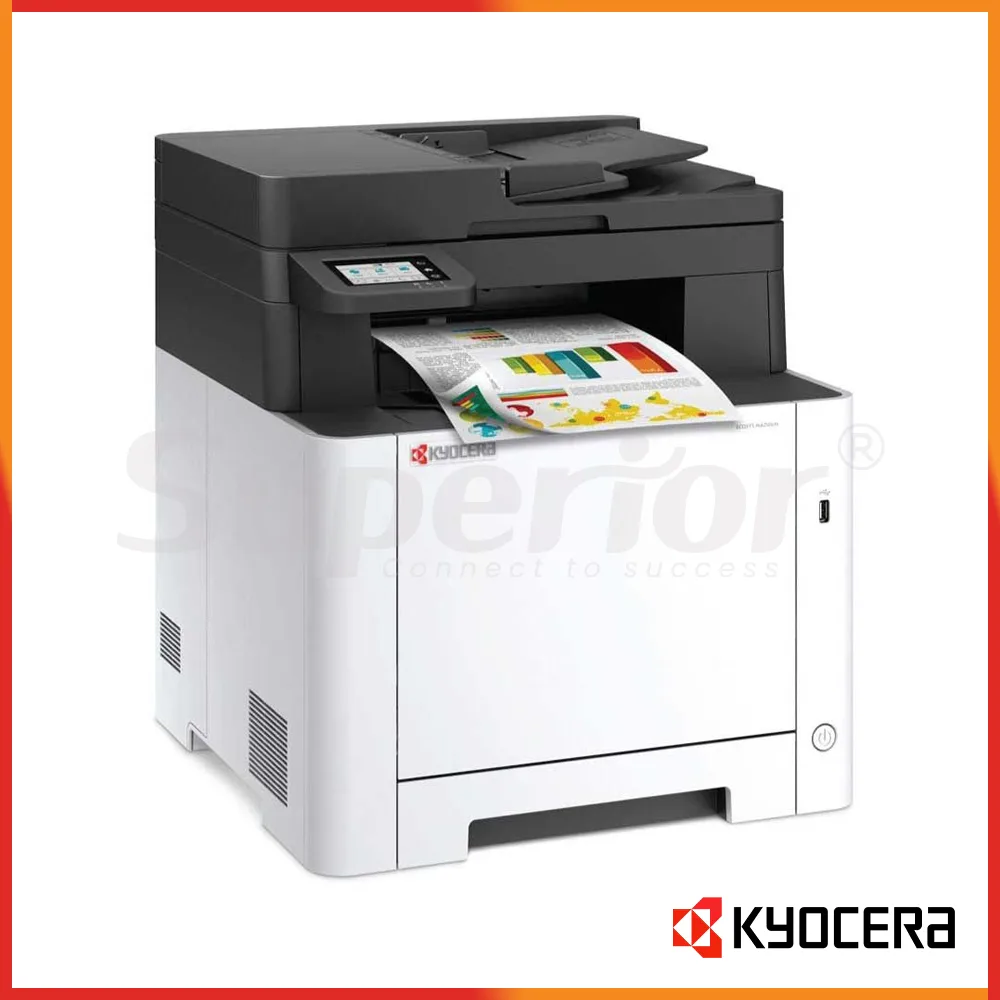


Kyocera ECOSYS MA2101cfx | Latest Model Color MFP
|
The Kyocera ECOSYS MA2101cfx is a compact A4 colour multifunction printer for UAE offices that need printing, copying, scanning and fax in one machine without moving to a larger floor-standing photocopier. This listing is for the Latest Model condition and is supplied as new stock rather than as a refurbished unit. With up to 21 pages per minute in both colour and black and white, standard automatic duplex printing, a 50-sheet document feeder and wired network connectivity, it is well suited to small and medium workgroups that need professional everyday document handling from a desktop-size MFP.
Superior Office Services LLC recommends this model for businesses where colour is useful for quotations, presentations, charts, forms and customer documents, but the print volume does not justify a larger A3 colour photocopier. The MA2101cfx also gives users colour scanning and standard fax, making it useful for offices that still deal with incoming paper, signed documents or fax-based communication as part of their normal workflow.
The machine is A4 and Legal class rather than A3. That makes it easier to place on a cabinet, counter or suitable printer stand and can be a better fit for offices where almost every document is A4. Buyers who genuinely require A3 should consider a TASKalfa or another A3 model instead. Choosing the right paper format at the beginning avoids paying for a larger machine that the office may rarely use.
In Abu Dhabi, the MA2101cfx can work well for accounts departments, small corporate teams, reception areas, clinics, training centres, schools, consultancies and service companies. Typical jobs include invoices, quotations, customer forms, reports, letters and colour charts. Because scanning and fax are built in, the same machine can also handle signed documents, supplier paperwork and other records that need to be sent or archived digitally.
For Dubai offices, this model is particularly useful where desk and floor space are limited. A small sales team, trading office, property company or professional-services business may not need a full-size A3 copier, but staff still need reliable colour printing and network scanning. The MA2101cfx offers those functions in a compact format while retaining a standard paper cassette, multipurpose tray and automatic duplex printing.
In Musaffah, the machine can suit trading companies, workshops, warehouses, automotive businesses, contractors and service offices where the administrative team is separated from the main industrial activity. It can handle quotations, purchase orders, delivery paperwork, job documentation, product sheets and colour-coded forms. As with any office printer installed near an industrial environment, the machine should preferably be placed in a clean, air-conditioned office area away from direct dust, workshop traffic and heat.
The MA2101cfx is also useful as a secondary colour MFP. A larger business may already have an A3 photocopier in a central location but need a smaller device for a department that works primarily with A4 documents. In that arrangement, the ECOSYS can reduce unnecessary walking and keep smaller jobs away from the main copier.
It is important to distinguish the MA2101cfx from the MA2101cwfx. The MA2101cfx includes standard wired Ethernet connectivity, while the related cwfx version is intended for installations requiring built-in wireless networking. If Wi-Fi is an essential part of the requirement, Contact SOS before ordering so the correct variant can be confirmed.
| Specification | Kyocera ECOSYS MA2101cfx |
|---|---|
| Condition | Latest Model / new stock |
| Machine type | A4 colour multifunction printer |
| Main functions | Print, Copy, Scan, Fax |
| A4 print speed | Up to 21 ppm mono / 21 ppm colour |
| Maximum paper size | A4 / Legal |
| Print resolution | 600 x 600 dpi; up to 1200 x 1200 dpi |
| Processor | ARM Cortex-A53 single core 1.0 GHz |
| Memory | 1 GB standard / maximum 1 GB |
| Warm-up time | Approximately 32 seconds |
| Document processor | Standard 50-sheet ADF |
| Control panel | 2.7-inch touch screen |
| Standard paper capacity | 250-sheet cassette + 50-sheet multipurpose tray |
| Maximum paper capacity | 550 sheets with PF-5110 option |
| Output capacity | Up to 150 sheets face-down |
| Automatic duplex | Standard |
| Network | Gigabit Ethernet standard |
| Maximum monthly duty | Enquire with SOS |
The 21 ppm print speed applies to both black-and-white and colour A4 pages. This is useful for an office that regularly switches between mono and colour because the machine does not have a much slower headline speed when colour is selected. It is not intended as a high-volume production machine, but for small and medium workgroups producing short and medium-length documents throughout the day, 21 ppm is a practical speed class.
The standard 1 GB memory is also the maximum listed for this series, so there is no need to plan a memory upgrade. For normal Word documents, spreadsheets, PDFs, presentations and network printing, the machine is designed to work with its standard memory configuration. Buyers with unusually complex print workflows should explain those requirements before ordering so SOS can confirm whether this model is appropriate.
The compact body measures approximately 410 mm wide, 416 mm deep and 457 mm high in the referenced regional specification, with a main-unit weight of about 26 kg. Those dimensions make it easier to position than a floor-standing A3 MFP, although adequate space should still be left around the device for the cassette, multipurpose tray, document feeder and service access.
The 2.7-inch touch screen provides access to copy, scan, fax and device settings. It is smaller than the larger panel used on the MA2600-series models, which is worth considering if the office expects frequent walk-up scanning and complex menu use. For straightforward office tasks, the smaller interface keeps the machine compact and focused.
| Function | Performance | Practical Buyer Note |
|---|---|---|
| Print - Mono | Up to 21 ppm A4 | Suitable for routine invoices, reports and office documents |
| Print - Colour | Up to 21 ppm A4 | Useful for proposals, charts, presentations and customer documents |
| First print - Mono | Approximately 11 seconds | Suitable for normal short office jobs |
| First print - Colour | Approximately 12.5 seconds | Colour output starts shortly after processing |
| Copy speed | Up to 21 ppm mono / colour | Same general engine speed as printing |
| First copy - Mono | Approximately 10 seconds | Useful for everyday walk-up copying |
| First copy - Colour | Approximately 12 seconds | Suitable for occasional colour copies |
| Scan - Mono | Up to 27 ipm simplex at 300 dpi | Useful for invoices, signed forms and office records |
| Scan - Colour | Up to 22 ipm simplex at 300 dpi | Preserves colour signatures, stamps and images |
| Scan destinations | SMB, Email, FTP, USB, TWAIN and WSD | Configuration depends on customer network |
| Fax | Standard, up to 33.6 kbps | Network fax is supported |
For general office printing, the MA2101cfx produces up to 21 pages per minute regardless of whether the job is mono or colour. This is useful when a business does not want staff worrying about a major speed penalty every time colour is selected. Colour is especially useful for graphs, account reports, safety markings, presentation material, company forms and documents where information needs to be visually separated.
Print resolution supports 600 x 600 dpi and a higher 1200 x 1200 dpi mode. For ordinary business use, this is suitable for clear text, tables, line graphics and colour office documents. The MA2101cfx should still be viewed as an office MFP rather than a specialist photographic or production graphics device. If the requirement is heavy marketing production, specialist media or advanced colour-management work, another type of machine should be considered.
Copying supports multiple copies, manual zoom from 25 percent to 400 percent and originals up to A4 or Legal size. This is appropriate for general administrative work where staff need quick duplicate copies of forms, letters, identity-related documents and customer paperwork. Because the machine has an ADF, multi-page originals can be placed in the feeder instead of copying each sheet from the platen individually.
Scanning is available in full colour, grayscale and black and white. The manufacturer specifies up to 27 images per minute for mono simplex scanning and up to 22 images per minute for colour simplex scanning at 300 dpi. The MA2101cfx uses a standard ADF rather than the higher-speed dual-scan document processor found on some MA2600-series configurations, so customers with very heavy two-sided scanning should discuss another model if scan productivity is a major part of the purchase.
Scan destinations include SMB network folders, email, FTP or FTP over TLS, USB, TWAIN and WSD. File formats include commonly used business formats such as PDF, JPEG and TIFF. The correct network configuration depends on the customer's IT setup. If scan-to-folder or scan-to-email is required, it helps to prepare network permissions and email information before the installation date.
Fax is standard on the MA2101cfx. The specification lists transmission up to 33.6 kbps, transmission time of approximately three seconds or less under the stated test conditions, and network fax support. For companies that still exchange documents by fax, this removes the need to add a separate fax option later. Businesses that no longer use fax can simply leave the function unused.
| Paper / Option | Specification | Practical Use |
|---|---|---|
| Main cassette | 250 sheets | Everyday A4 office paper |
| Multipurpose tray | 50 sheets | Letterhead, heavier media and occasional special paper |
| Standard total input | 300 sheets | Suitable for small and medium workgroups |
| PF-5110 | Optional 250-sheet paper feeder | Raises maximum capacity to 550 sheets |
| Maximum total input | 550 sheets | Reduces refill frequency or provides another paper source |
| Cassette size | A6R to A4 / Legal | Supports common office formats |
| MPT size | A6R to A4 / Legal plus supported custom sizes | Useful for less common media |
| Cassette paper weight | 60 to 163 g/m2 | General office paper range |
| MPT paper weight | 60 to 220 g/m2 | Supports a wider range of approved media |
| Automatic duplex | A5R to A4 / Legal, 60 to 120 g/m2 | Automatic two-sided office output |
| Output | Up to 150 sheets face-down | Suitable for normal workgroup jobs |
The standard paper setup consists of a 250-sheet main cassette and a 50-sheet multipurpose tray. This gives a total input capacity of 300 sheets. For a small office, that may be sufficient, particularly when print jobs are spread through the day. The MPT can be reserved for letterhead, another paper size or approved heavier media so users do not need to empty the main cassette each time a different stock is required.
If the office prints more frequently or wants another dedicated paper source, the optional PF-5110 adds 250 sheets and brings the total capacity to 550 sheets. This can be valuable in accounts, reception or administration areas where the printer is shared by several users. An extra tray can also be used for a different paper type rather than simply increasing capacity.
The main cassette accepts media from A6R up to A4 and Legal class, while the multipurpose tray supports additional custom sizes within the manufacturer's stated dimensions. The cassette accepts paper weights from 60 to 163 g/m2 and the multipurpose tray supports up to 220 g/m2. If an office regularly uses labels, envelopes, pre-printed forms or specialty media, the actual stock should be checked before committing to regular production.
Automatic duplex printing is standard on supported paper sizes from A5R through A4 or Legal and on media within the specified duplex weight range. This allows reports, proposals, training documents and internal paperwork to be printed on both sides automatically. Setting duplex as the default can also help businesses control everyday paper consumption where two-sided output is suitable.
The MA2101cfx does not use a large copier-style floor finisher. If stapled sets, booklet making or advanced document finishing are important to the workflow, a larger TASKalfa or another suitable MFP should be considered. For small office jobs that are normally collected directly from the output tray, the simpler desktop design is usually more appropriate.
| Consumable | Colour / Type | Approx. Yield | Notes |
|---|---|---|---|
| TK-5495K | Black high-yield toner | Approx. 2,800 pages (ISO/IEC 19798) | Confirm UAE-market kit with SOS |
| TK-5495C | Cyan high-yield toner | Approx. 2,400 pages (ISO/IEC 19798) | Confirm UAE-market kit with SOS |
| TK-5495M | Magenta high-yield toner | Approx. 2,400 pages (ISO/IEC 19798) | Confirm UAE-market kit with SOS |
| TK-5495Y | Yellow high-yield toner | Approx. 2,400 pages (ISO/IEC 19798) | Confirm UAE-market kit with SOS |
| TK-5485K | Black standard-yield toner | Approx. 1,250 pages (ISO/IEC 19798) | Confirm UAE-market kit with SOS |
| TK-5485C | Cyan standard-yield toner | Approx. 1,250 pages (ISO/IEC 19798) | Confirm UAE-market kit with SOS |
| TK-5485M | Magenta standard-yield toner | Approx. 1,250 pages (ISO/IEC 19798) | Confirm UAE-market kit with SOS |
| TK-5485Y | Yellow standard-yield toner | Approx. 1,250 pages (ISO/IEC 19798) | Confirm UAE-market kit with SOS |
| Starter toner | Black, Cyan, Magenta, Yellow | Approx. 1,200 pages each | Manufacturer lists this in applicable regional supply |
| Waste toner | Service / consumable item | Not applicable | Exact UAE replacement arrangement: Enquire with SOS |
| Drum / developer | Long-life service components | Not a toner yield | Replacement and service requirements: Enquire with SOS |
| Staple cartridge | Not applicable | Not applicable | This desktop MFP does not use a copier-style stapling finisher |
The MA2101cfx has two toner-capacity families listed in Kyocera's applicable regional information. The higher-capacity TK-5495 family includes black, cyan, magenta and yellow cartridges, with manufacturer ISO/IEC 19798 figures of approximately 2,800 pages for black and 2,400 pages for each colour. The lower-capacity TK-5485 family is listed at approximately 1,250 pages for each colour.
Those published numbers are ISO/IEC 19798 page-yield figures. They should not be relabelled as an exact 5 percent coverage guarantee. Actual toner consumption changes according to the documents printed. A business producing mainly text with small colour logos will consume toner differently from an office printing photographs, full-page backgrounds, marketing sheets or heavily coloured charts.
The higher-capacity TK-5495 family is generally worth considering where the machine is used regularly because fewer cartridge changes may be required. A lighter-use office may have different priorities. SOS can review the expected volume and advise on the appropriate toner supply rather than making the decision only from the cartridge yield.
Starter toner is different from normal replacement toner. Applicable Kyocera regional documentation lists approximately 1,200 pages for black, cyan, magenta and yellow starter toner. Buyers should therefore avoid assuming that the toner initially supplied with the machine has the same capacity as a full high-yield replacement set.
Colour usage also needs to be considered as four separate consumables. Cyan, magenta and yellow will not always finish at the same time. A company with blue-heavy corporate documents may consume cyan differently from a business whose forms use another dominant colour. Keeping the correct spare toner on site can be useful where the MFP is important to daily operations.
SOS can advise on genuine toner and suitable compatible supply according to the customer's machine and service arrangement. The exact UAE-market consumable code should always be confirmed against the supplied unit before purchasing toner in quantity. Similar model families may have different regional suffixes, so ordering only from a visual cartridge match is not recommended.
Service items such as drums, developer-related components and waste collection should be treated separately from normal toner replacement. Their service timing depends on the machine, component condition and applicable maintenance plan. If the office wants a predictable support arrangement rather than managing each service item individually, SOS can discuss the available service approach when quoting the machine.
The value of an office MFP depends on more than its print speed. Users need the network printing to work, scan destinations to be configured correctly, toner to be available and the machine to be accessible when service is required. Planning those points before installation gives a better result than treating the printer as a box that simply needs to be placed on a desk.
Superior Office Services LLC can assist with product selection, supply, delivery, installation, network setup, scan configuration and toner planning for businesses in the UAE. Before the machine is supplied, the customer can explain the number of users, expected monthly volume, document types and preferred scan workflow. This helps confirm whether the MA2101cfx is appropriately sized for the office.
For businesses replacing an older printer, it is useful to explain why the existing machine is being changed. If the old device is too slow, 21 ppm may or may not be enough depending on the previous model. If staff need colour but currently have only mono, the MA2101cfx can solve that requirement. If the main problem is heavy scanning, another model with a faster dual-scan document processor may provide a better improvement.
Network requirements should also be checked. The cfx model is intended primarily for wired Ethernet installation. Where built-in wireless connectivity is required, the related MA2101cwfx should be considered. A wired connection is often preferred in permanent office installations because the machine can remain connected to the business network without depending on local Wi-Fi conditions.
Scan setup should be planned with the customer's IT team where necessary. Scan-to-SMB requires an accessible network folder and correct permissions. Scan-to-email requires suitable mail settings. Preparing those details before the installation visit allows the technician to configure the required workflow efficiently.
Paper and environmental conditions also affect reliability. Store paper flat and dry, preferably in its original wrapping until it is required. In Musaffah industrial environments, keep the MFP away from direct workshop dust and avoid locating it where hot outside air enters continuously. These practical details can have as much effect on everyday feeding as the machine specification itself.
Choose the MA2101cfx if the office needs an A4 colour MFP with print, copy, scan and fax functions and a 21 ppm speed class is suitable for the number of users. It fits small and medium workgroups where colour is useful but daily print volume remains within the range of a compact desktop device.
It is a good option for an accounts or administration office that prints mainly text but occasionally needs coloured charts, logos, forms or highlighted information. It also suits customer-facing teams where quotations and proposals look better in colour but there is no need for an A3 floor-standing copier.
Choose this model where standard fax is still useful. Some businesses no longer need fax, but others continue to work with suppliers, healthcare organisations or external partners that use it. Having fax included can avoid another device or later upgrade.
Ask SOS about the MA2101cwfx if built-in Wi-Fi is an important requirement. The core speed and document functions are closely related, but the wireless variant is better suited where a wired network point is unavailable or where wireless installation is specifically required.
Ask about an MA2600-series model if users need faster 26 ppm output, a larger touch panel or a higher-specification document processor. The difference can matter in offices that scan multi-page documents frequently or have more users sharing one machine.
Choose an A3 colour MFP if the office regularly prints or copies A3. The MA2101cfx supports up to A4 and Legal class. Buying it for an office that regularly handles A3 would create a limitation regardless of how suitable the other features are.
For high-volume printing, also consider a larger machine. A compact 21 ppm MFP is convenient, but a department producing long print queues for many users may be better served by a faster ECOSYS or TASKalfa model with larger paper capacity and higher-capacity consumables.
You can buy the Kyocera ECOSYS MA2101cfx through Superior Office Services LLC. Visit sosauh.com for SOS printer, photocopier and support services, or Contact SOS on WhatsApp for current stock, a demo, commercial quote, delivery, installation and toner supply.
SOS has office locations in Abu Dhabi, Dubai and Musaffah. For Abu Dhabi enquiries, call 02 442 9966. For Dubai, call 04 324 0050. For Musaffah, call 02 550 5265. Mobile contacts are +971 50 969 4734 and +971 50 159 4734. The primary WhatsApp contact is +971 50 969 4734.
When requesting a quote, tell the SOS team approximately how many users will share the MFP, expected monthly print volume, whether colour is used regularly, how much scanning is required and whether the machine will be connected through wired Ethernet. If your office requires Wi-Fi, mention that before ordering so the MA2101cwfx or another suitable option can be compared.
For consumables, ask SOS to verify the correct TK-5495 or TK-5485 toner references for the supplied UAE machine before purchasing toner in quantity. The team can also discuss genuine or suitable compatible toner according to your preference, expected usage and service arrangement.
For installation, prepare any network and scanning requirements in advance where possible. If scan-to-email or scan-to-folder is required, having the necessary IT information available can make the installation process faster. For stock, demo, delivery, installation and a commercial quote, visit sosauh.com or Contact SOS on WhatsApp.
For a UAE office that needs a compact current-generation A4 colour MFP with 21 ppm colour and mono performance, standard duplex printing, a 50-sheet document feeder, colour scanning and built-in fax, the Kyocera ECOSYS MA2101cfx is a practical model to shortlist for Abu Dhabi, Dubai or Musaffah.
Additional Information
What can I help with?