-
-
-
Abu Dhabi | Dubai | Musaffah




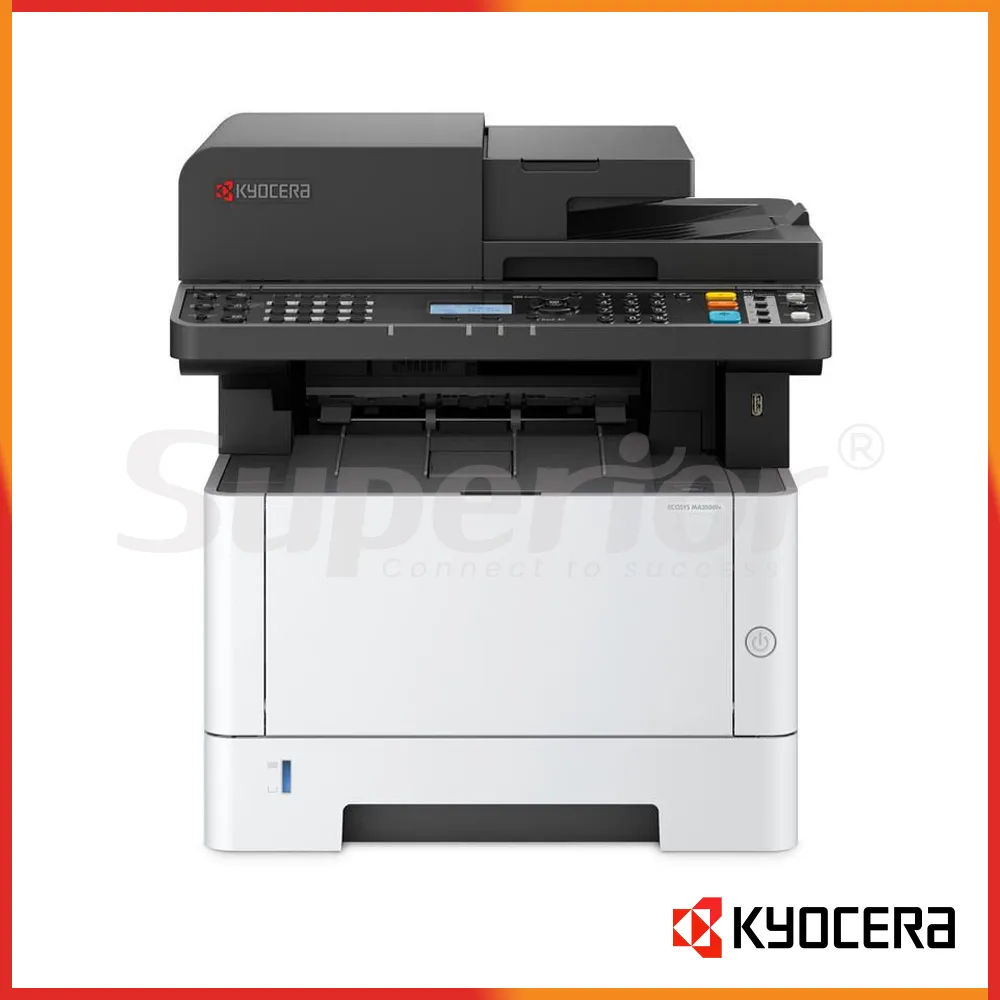

Kyocera ECOSYS MA3500fx | Latest Model Mono MFP
|
The Kyocera ECOSYS MA3500fx is a current-generation A4 monochrome multifunction printer for offices that need dependable black-and-white printing without moving to a larger A3 copier. It prints, copies, scans and faxes from one compact desktop unit, with a rated A4 print speed of up to 35 pages per minute.
This model makes sense for accounts teams printing invoices, reception desks handling customer forms, clinics producing reports, trading companies working with quotations, and warehouse admin staff printing delivery notes throughout the day. It is a mono machine, so it is aimed at text-heavy office work rather than colour brochures or marketing sheets.
The MA3500fx is supplied here as a Latest Model unit. For a buyer comparing it with older ECOSYS machines, the main attraction is straightforward: useful office speed, automatic duplex, network printing, document scanning and fax capability in one A4 device. If your office mainly uses A4 and Legal paper, it can be a practical fit without taking the floor space of an A3 multifunction copier.
| Specification | Details |
|---|---|
| Type | A4 monochrome multifunction printer |
| Functions | Print, copy, scan and fax |
| Print speed | Up to 35 ppm, A4 mono |
| Memory | 1 GB |
| Paper input | 250-sheet cassette plus 100-sheet multipurpose tray |
| Maximum paper capacity | Up to 850 sheets with optional paper feeders |
| Paper size | Up to A4 / Legal |
| Duplex | Automatic two-sided printing |
| Document feeder | 50-sheet automatic document feeder |
| Connectivity | USB 2.0 and Gigabit Ethernet |
For daily work, 35 ppm is quick enough for shared office queues such as monthly statements, purchase orders, service reports and batches of delivery notes. The standard 250-sheet cassette handles regular office paper, while the 100-sheet multipurpose tray is useful when staff need to switch to letterhead, labels or another supported media type without emptying the main tray.
Automatic duplex can reduce paper use on internal files, contracts and longer reports. The 50-sheet feeder is useful when several originals need to be copied or scanned together. Scan destinations include common office workflows such as e-mail, network folders, FTP and USB, depending on how the machine is configured on your network.
| Item | Details |
|---|---|
| Black toner | TK-1295 |
| Published yield | Up to 3,000 pages under ISO/IEC 19752 |
| UAE supply | Confirm current toner code and availability with SOS |
For routine office buying, toner planning matters more than the headline printer price. Published regional data lists the TK-1295 black toner for the MA3500fx with a 3,000-page rating under ISO/IEC 19752. Actual usage will still change with page coverage, print settings and the kind of documents your team produces. A warehouse printing dense delivery documents can consume toner differently from an accounts desk printing mostly short invoices.
Ask SOS before you buy toner in bulk. Consumable references can vary by market, and it is better to confirm the exact UAE supply code against the machine before ordering several units. SOS can also advise on genuine or suitable supply options based on what is available for the installed device.
The MA3500fx includes wired network connectivity, making it suitable for a shared workgroup where several PCs print to one device. USB is also available for direct connection. If Wi-Fi is important for your office layout, Enquire with SOS before purchase so the required wireless option or a more suitable wireless model can be checked first.
Installation is not only about connecting the power cable. A proper office setup may include assigning a fixed network address, installing print drivers, setting default paper sizes, enabling duplex, creating scan-to-folder destinations and testing scan-to-email. Fax settings can also be checked where the office still uses fax for supplier, clinic or administrative documents.
Superior Office Services LLC (SOS) supports UAE customers with printer supply, installation, setup and service requirements. If you are replacing an older Kyocera unit, SOS can help check whether the MA3500fx suits your paper size, monthly office pattern, network setup and scanning requirements before you place the order.
For availability, installation details and current UAE supply, visit sosauh.com or use Contact SOS on WhatsApp. You can also call Abu Dhabi on 02 442 9966, Dubai on 04 324 0050, or Musaffah on 02 550 5265. Mobile support is available on +971 50 969 4734 and +971 50 159 4734.
Additional Information
What can I help with?